• Skip to primary navigation
  • Skip to main content
  • Skip to primary sidebar
  • Skip to footer
  • MEET CHRISTY & AMY
    • IF YOU’RE NEW HERE…
    • WORK WITH US
    • 11 MAGNOLIA LANE 101
    • DISCLOSURE + PRIVACY (the fine print)
    • BEST OF 11 MAGNOLIA LANE
  • TOUR OUR HOMES
    • TOUR OUR HOMES
    • CHRISTY’S MAGNOLIA COTTAGE
    • CHRISTY’S MCC HOUSE
    • Christy’s Stuttgart Flat
    • Amy’s Virginia Craftsman Home Tour
    • AMY’S VIRGINIA CRAFTSMAN Building Process
    • HOLIDAY HOME TOUR SERIES
  • CELEBRATIONS
    • EVENTS + ENTERTAINING
    • GIFTS
    • HOLIDAYS
    • RECIPES
  • HOME
    • CLEANING
    • DECORATING
    • ORGANIZING
    • ROOM BY ROOM
      • BATHROOMS
      • BEDROOMS
      • CLOSETS
      • CRAFT ROOMS + OFFICES
      • DINING ROOMS
      • KIDS’ ROOMS
      • KITCHENS
      • LAUNDRY ROOMS
      • LIVING + GREAT ROOMS
      • OTHER SPACES
      • PANTRIES
      • PLAYROOMS + BONUS ROOMS
      • PORCHES + OUTDOOR SPACES
    • TIPS
  • SHOP
    • SHOP OUR INSTAGRAM
    • SHOP OUR AMAZON STORE
    • FRIDAY FAVORITE FINDS
  • PROJECTS
    • CRAFTS
    • DIY PROJECTS + TUTORIALS
    • FURNITURE
    • PRINTABLES
    • WINDOWS, DOORS, + WALLS
  • LIFE
    • FRIDAY FREE FOR ALL
    • HEALTH
    • SIMPLY ON SUNDAY
  • TRAVEL
  • CONTACT
    • Email
    • Facebook
    • Instagram
    • Pinterest

11 Magnolia Lane

Sharing our easy DIYs, decorating, entertaining and more!

Tutorial: How to Make Vines Vinyl Monograms Using the Silhouette CAMEO

March 2, 2015 By Christy 28 Comments

This Post Contains Affiliate Links

8568 shares
  • 12

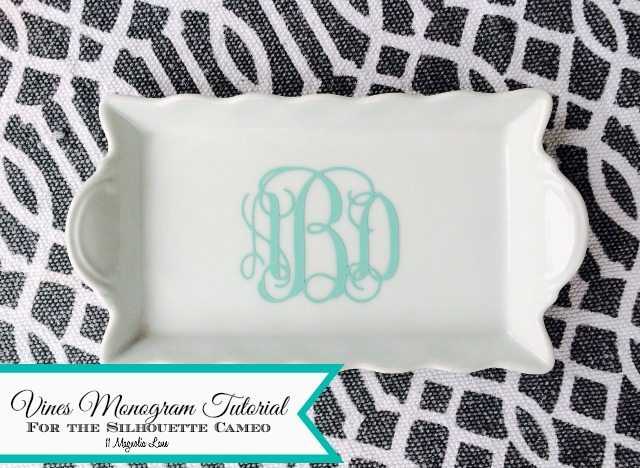
How to create a "vines" vinyl monogram | 11 Magnolia Lane
Note: Since I wrote this post, there are literally hundreds of monogram fonts available to purse for just a few dollars; honestly, that’s probably faster than using this technique!

A few months ago, I showed you how to make round vinyl monograms on the Silhouette CAMEO using a “hack,” and today I’m back with a very similar tutorial that will help you make the traditional interlocking “vines” monograms using the same technique (plus some updated tips on how to cut them successfully).  Please note that this technique is for personal use only (if you’re going to make monograms to sell them, you still need to purchase a commercial license for the font; I like this one and it’s only a few dollars)

First step is to download a monogram app for your iPhone and create your monogram.  I’ve found that using a solid black background and white text works best.
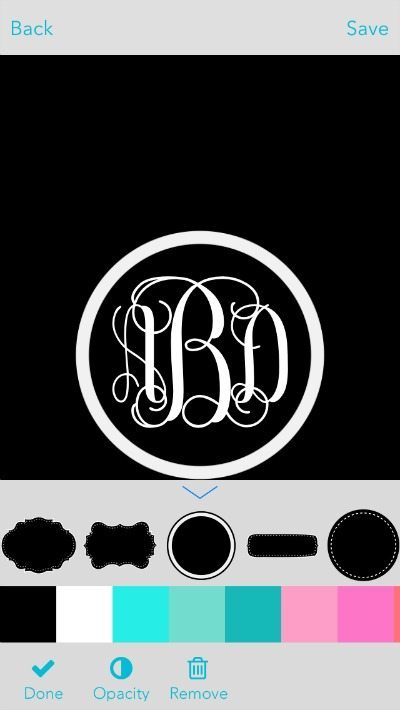
How to create a "vines" vinyl monogram | 11 Magnolia Lane
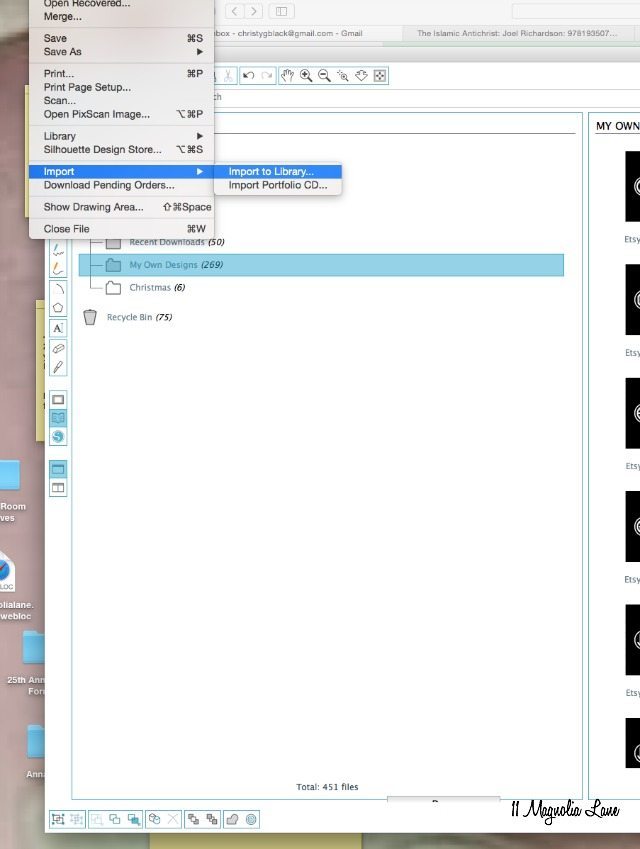
Once you’ve created and saved your monogram,  load it onto your computer.  I usually just email it to myself.  Then, open Silhouette Studio and import the photo:

How to create a "vines" vinyl monogram | 11 Magnolia Lane

The image will then be stored in your library in the “My Own Designs” section.  Double click on it to add it to a new design.  Drag a corner to make the image larger:
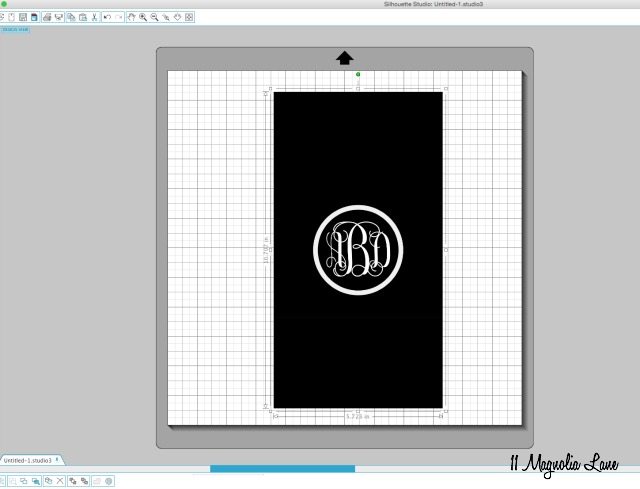
How to create a "vines" vinyl monogram | 11 Magnolia Lane

Next, click on the Trace button at the top right (the black arrow is pointing to it in the below photo):
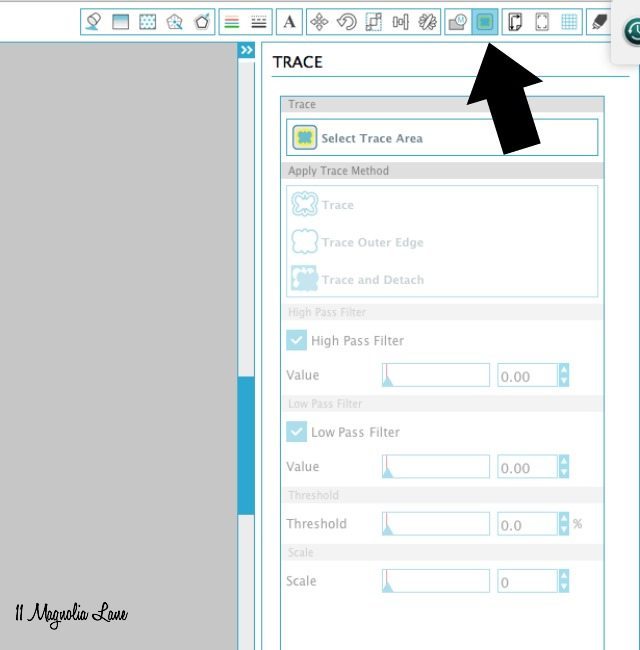
How to create a "vines" vinyl monogram | 11 Magnolia Lane

Click “Select Trace Area,” then use your mouse to drag a box around the monogram; be sure not to cut it too close and leave plenty of room around the circle.  When you release your mouse, your screen will look something like this:
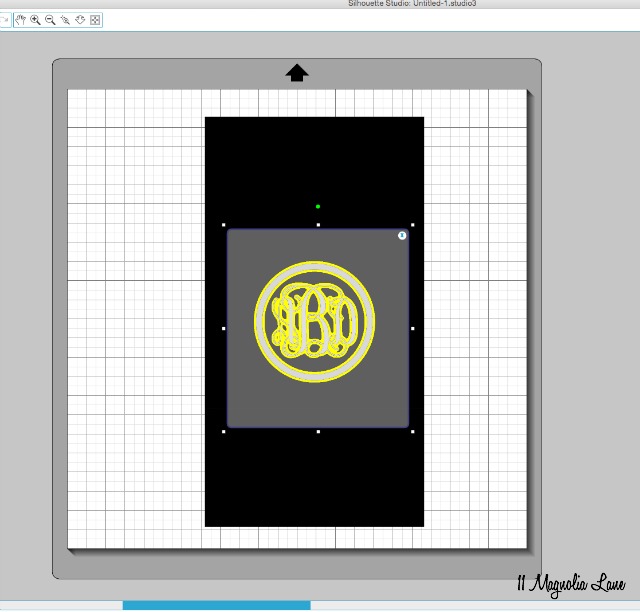
step-4


Now, head over to the right side of your screen and check “Low Pass Filter,” uncheck “High Pass Filter,” and then click “Trace.”  The yellow lines will turn to red.  Here are my settings:
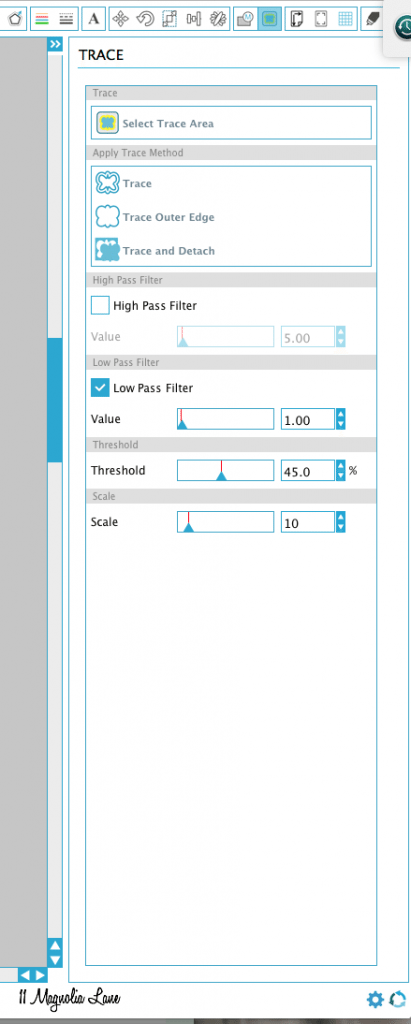
How to create a "vines" vinyl monogram | 11 Magnolia Lane

Now, drag your jpg (the original monogram) away to the side and delete it. It’s still in your library if you need it again in the future.  (I keep all of the monograms I’ve created in my library and if I ever need them again, I just re-create the cut file using these steps)
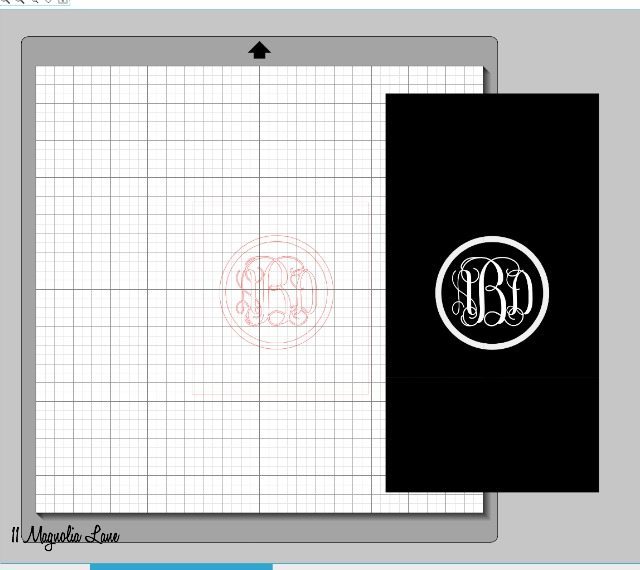
How to create a "vines" vinyl monogram | 11 Magnolia Lane

You’re left with the monogram with a red square around it.  Click on the monogram to select it, right mouse click to pull up the menu (as shown below), and select “Release Compound Path.”
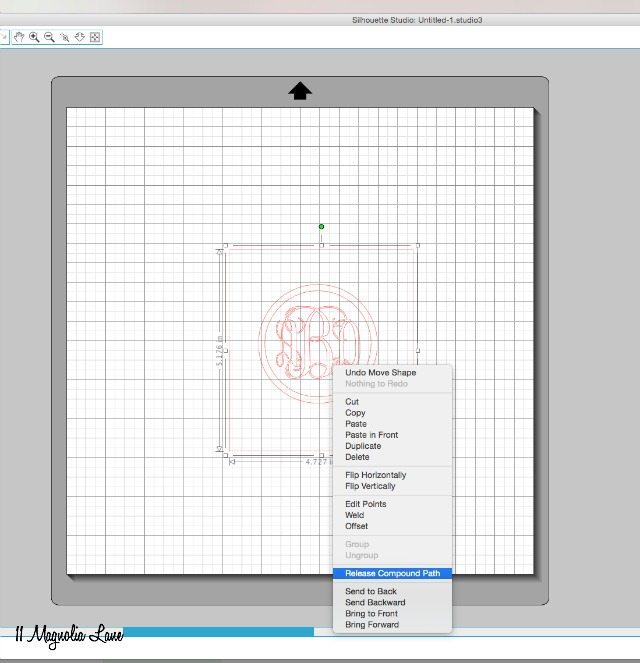
How to create a "vines" vinyl monogram | 11 Magnolia Lane

Now you can delete all of the red lines individually.  Select the outer red square and delete it.  Then, if you’d rather have the monogram without the circle around it, select the two circles and delete them (that’s what I did for this project).

Next, drag a square around the monogram, and right mouse click again.  This time, select “Make Compound Path.”  Your monogram can now be sized as a single unit.
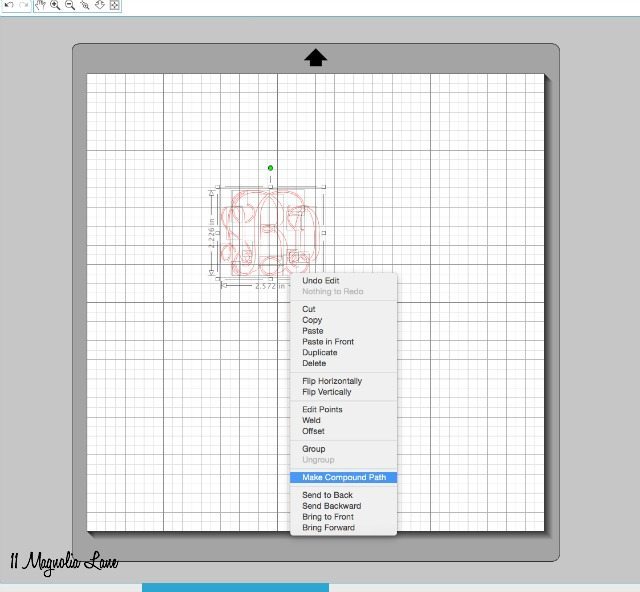
How to create a "vines" vinyl monogram | 11 Magnolia Lane

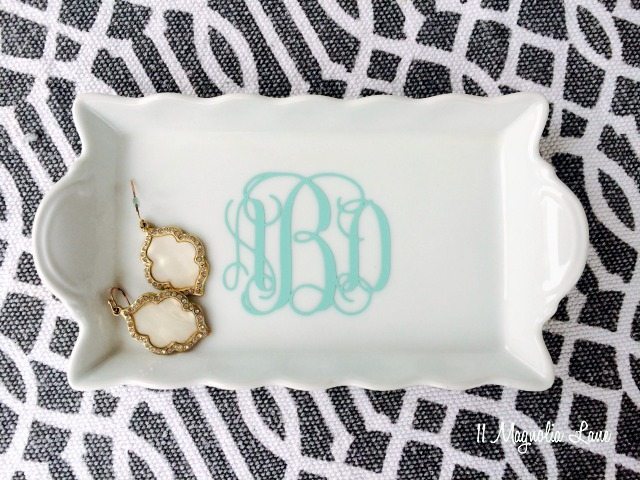
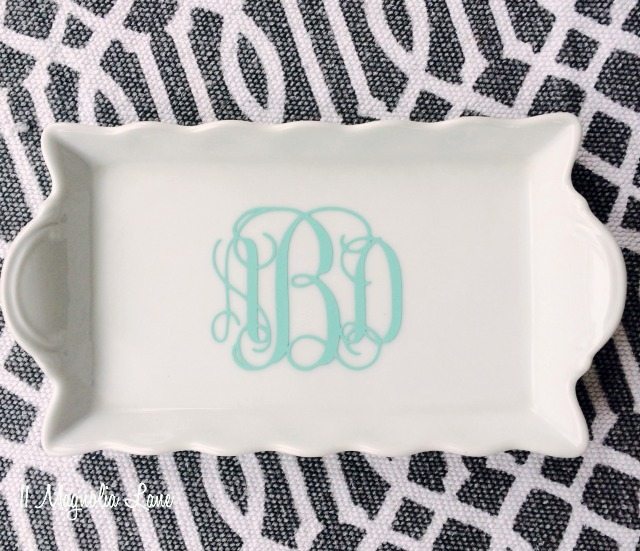
I made mine 2.25″ high for the little white platter I used for this project.  I found it at Goodwill, believe it or not, but I see little white bowls and platters all the time at HomeGoods, Pier 1, and Target, that are perfect for this sort of monogram.

This is the exact vinyl I used, if you like the aqua blue color (they actually call it “mint.”).  It’s from Expressions Vinyl and it’s inexpensive yet very high quality–the perfect combination, right?!  Their metallic gold vinyl is my absolute favorite (we used it on our DIY jewelry bowl project).
How to create a "vines" vinyl monogram | 11 Magnolia Lane

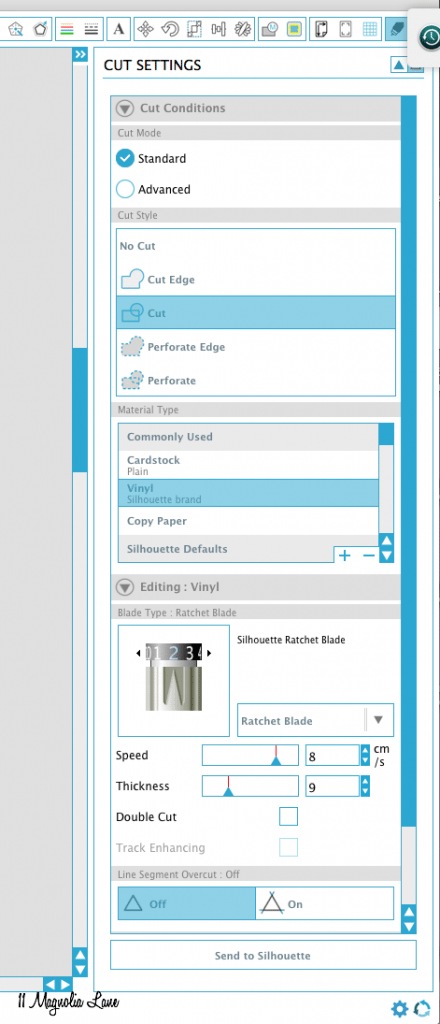
I’m going to show you my cut settings; they are just the default Silhouette settings for vinyl:
How to create a "vines" vinyl monogram | 11 Magnolia Lane

I’ve had a few friends lately tell me that they’re not getting a good cut with their machines.  This has happened to me in the past, so here’s a quick list of things to troubleshoot, and yes, some of them are very basic:

1.  Make sure that your blade is set to the correct number.  #2 works great for me with vinyl.

2. Check to see that the blade is correctly seated in the carriage; take it out and replace it to be sure.

3. Blades last forever; seriously, I have been using the same one for 8 months now and I cut vinyl for our Etsy shop, so mine gets a real workout.  Your blade probably isn’t worn out, but you can always change it and see what happens.

4.  The vinyl that you use is enormously important; I only use vinyl from {this} source and I can tell the difference when I use a different brand because it doesn’t weed as well.

5.  Check to be sure that both your software AND your machine are set for Cutting Mat (or no cutting mat).  If they don’t match up, you can have issues.

6.  Update to the latest Silhouette software here.

You want your vinyl to weed perfectly without any half-cut lines; that can ruin an entire project.  Hopefully those tips will help, but feel free to comment if they don’t and I’ll try to help.
How to create a "vines" vinyl monogram | 11 Magnolia Lane

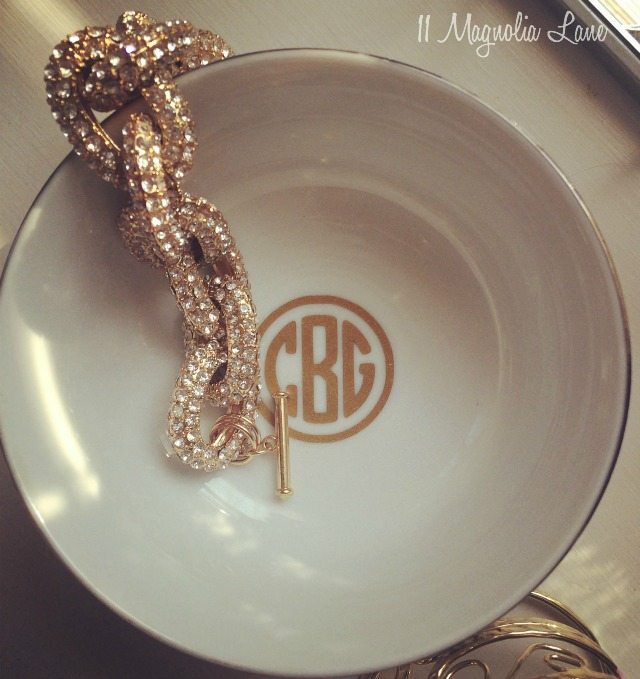
Here’s the round monogram you can cut using a similar technique (and that tutorial is here):
How to create a "vines" vinyl monogram | 11 Magnolia Lane

I’m a Silhouette affiliate and they usually run a great bundle deal once a month that you need my coupon code to get (it’s MAGNOLIA, by the way), but there isn’t one going on right now, so here’s a good deal from Amazon for a Silhouette CAMEO starter bundle:

My CAMEO is 3-1/2 years old and still going strong–I love it and have made SO many gifts with it.  You can see more of those {here}.

I’m sure this goes without saying, but if you’re planning to create monograms to sell, then you should buy a licensed vines font. There are quite a few out there that are licensed for commercial use, some are just a few dollars like {this} one.

Let me know if you have any questions, and thanks for stopping by!

Disclosure:  some of the links I used are affiliate links, which means that if you make a purchase after clicking through the links, I will earn a small commission (I’ll name my yacht after you!).  You don’t pay a cent more than you would otherwise!

Final New Christy headshot 2015
 

icon-facebook-1icon-instagram-1icon-mail-1icon-pinterest-1icon-twitter-1NEW Google+
 

YOU MIGHT ALSO LIKE THESE POSTS... :

Tutorial: Quick and Easy Way to Hang Silver ...
Easy DIY: Monogrammed Christmas Ornaments
Silhouette Tutorial: How to Make DIY Auction...
Back to Basics: How to Apply a Vinyl Decal

Filed Under: DIY/Projects/Tutorials, Monograms, Vinyl Projects Tagged With: Monogram, Silhouette, tutorial, vinyl

Primary Sidebar

Lowest prices. Straight Teeth,

•Visit Our Health + Wellness Site!•

•Don’t Miss A Thing!!•

•Do You Know Jesus?•

•Featured In•

Footer

  • Email
  • Facebook
  • Instagram
  • Pinterest

Copyright © 2026 · 11 Magnolia Lane· Blog Design by Little Blue Deer
Privacy Policy

11 MAGNOLIA LANE IS A PARTICIPANT IN THE AMAZON SERVICES LLC ASSOCIATES PROGRAM, AN AFFILIATE ADVERTISING PROGRAM DESIGNED TO PROVIDE A MEANS FOR US TO EARN ADVERTISING FEES BY ADVERTISING AND LINKING TO AMAZON.COM AND AFFILIATED SITES. AS AN AMAZON ASSOCIATE, WE EARN FROM QUALIFYING PURCHASES. WE ALSO PARTICIPATE IN SEVERAL OTHER AFFILIATE PROGRAMS; THIS INCOME ALLOWS US TO MAINTAIN THE QUALITY OF YOUR USER EXPERIENCE AND KEEPS OUR CONTENT FREE. WHEN YOU PURCHASE THROUGH ANY OF OUR AFFILIATE LINKS, WE EARN A SMALL COMMISSION AND YOU DON’T PAY A CENT MORE THAN YOU WOULD OTHERWISE; THAT WOULD BE TACKY!   READ OUR FULL PRIVACY AND DISCLOSURE POLICY {HERE}.
  ©11 Magnolia Lane 2023. Unauthorized use and/or duplication of this material without express and written permission from this blog’s authors and/or owners is strictly prohibited. Please email us at admin@11magnolialane.com for more information.

  • MEET CHRISTY & AMY
    • IF YOU’RE NEW HERE…
    • WORK WITH US
    • 11 MAGNOLIA LANE 101
    • DISCLOSURE + PRIVACY (the fine print)
    • BEST OF 11 MAGNOLIA LANE
    • Back
  • TOUR OUR HOMES
    • TOUR OUR HOMES
    • CHRISTY’S MAGNOLIA COTTAGE
    • CHRISTY’S MCC HOUSE
    • AMY’S NEW HOME BUILD
    • HOLIDAY HOME TOUR SERIES
    • SPRING HOME TOUR SERIES
    • Back
  • CELEBRATIONS
    • EVENTS + ENTERTAINING
    • GIFTS
    • HOLIDAYS
    • RECIPES
    • Back
  • HOME
    • CLEANING
    • DECORATING
    • ORGANIZING
    • ROOM BY ROOM
      • BATHROOMS
      • BEDROOMS
      • CLOSETS
      • CRAFT ROOMS + OFFICES
      • DINING ROOMS
      • KIDS’ ROOMS
      • KITCHENS
      • LAUNDRY ROOMS
      • LIVING + GREAT ROOMS
      • OTHER SPACES
      • PANTRIES
      • PLAYROOMS + BONUS ROOMS
      • PORCHES + OUTDOOR SPACES
      • Back
    • TIPS
    • Back
  • SHOP
    • SHOP OUR INSTAGRAM
    • SHOP OUR AMAZON STORE
    • FRIDAY FAVORITE FINDS
    • 11 ML ETSY SHOP
    • 11ML ORGANIZING SHOP
    • Back
  • PROJECTS
    • CRAFTS
    • DIY PROJECTS + TUTORIALS
    • FURNITURE
    • PRINTABLES
    • WINDOWS, DOORS, + WALLS
    • Back
  • LIFE
    • FRIDAY FREE FOR ALL
    • HEALTH
    • SIMPLY ON SUNDAY
    • TRAVEL
    • Back
  • CONTACT
    • Email
    • Facebook
    • Instagram
    • Pinterest
8568 shares
  • 12